♥ Welcome ♥

♥ My Blinkie ♥

Showing posts with label Valentines. Show all posts
Showing posts with label Valentines. Show all posts
♥ You & Me ♥

To View Tag In Proper Size Click On The Tag
Supplies Needed
Scrapkit Power Of Love by Stefs Scrapkits this is PTU
Tube of choice im using Keith Garvey This is a PTU Tube
if tube are unavailable please use another tube
Mask WSL_Mask84 at weescotslass
Font of choice or the one im using is NevisonCasD
Lets Get Started
Open new image 650x550
Open StarLightDesigns_CommercialUse_paper1_2 copy paste as new layer apply mask merge group
Open NLD Dots copy paste as new layer resize 85 percent add drop shadow
Open YalanaDesign_CU_vol63 (36) copy paste as new layer resize 70 percent with selection tool go around frame
Open StarLightDesigns_Designers CU94_papers (1) copy paste as new layer selection invert delete on ketboard drag under frame add drop shadow to frame
Open Delph_cu_wordarts_valentine'sday (1) copy paste as new layer drag under frame
Open YalanaDesign_CU_vol62 (49) copy paste as new layer add drop shadow
Open Cucciola_designs_cu_vol95_24 copy paste as new layer resize 55 percent add drop shadow
Open YalanaDesign_CU_vol.118 (1) copy paste as new layer resize 45 percent add drop shadow
Open GTD ep2 copy paste as new layer resize 75 percent erase slightly add drop shadow
open Tubes copy paste as new layer drag one under the frame add drop shadow to both tubes
Add your name Font NevisonCasD forground #000000 background #dc0000 add drop shadow & add gradient glow
Open Cucciola_designs_cu_4 copy paste as new layer resize 75 percent add gradient glow & add drop shadow
Add your copyright info
resize & save your tag
If you like this Tut check the boxes below Love to see your results please email to me
Thankyou ♥
Written by ©Lyn(akaAngel) 19th August 2012, any similarity to any other tutorial is purely coincidental!

♥ Love Me Forever ♥

To View Tag In Proper Size Click On The Tag
Supplies Needed
Scrapkit By Seachell Scrapz About Love Purple Valentine This is FTU you will find under Free Scraps
Here
Template Love Me Forever By Sinfully Creative Scraps
Here
Tube of choice im using ©Elias Chatzoudis to purchase tubes go to PTE Here
All my tubes are a guide if the tubes i select are unavailable please use another tube of your liking thankyou
Mask WSL_Mask320 at weescotslass
Here
Font of choice or the one im using is MrBlaketon
Lets Get Started
Open Template duplicate close original delete Raster 10
Open Seachell_PV_Paper6 copy paste as new layer apply mask merge group duplicate merge down add drop shadow
Go to Raster 7 selections select all float defloat Open Seachell_PV_Paper8 copy paste as new layer invert delete on keyboard select none add drop shadow
Go to Raster 3 selections select all float defloat Open Seachell_PV_Paper1 copy paste as new layer invert delete on keyboard select none add drop shadow
Go to Raster 2 selections select all float defloat Open Seachell_PV_Paper10 copy paste as new layer invert delete on keyboard select none add drop shadow
Open Seachell_PV_Element22 copy paste as new layer image rotate 90 percent left add drop shadow
Go to Raster 5 selections select all float defloat Open Seachell_PV_Paper4 copy paste as new layer invert delete on keyboard select none effects texture effects Blinds with this setting

add drop shadow
Go to Raster 6 selections select all float defloat Open Seachell_PV_Paper4 copy paste as new layer invert delete on keyboard select none repeat Blinds as above add drop shadow
Go to Raster 4 selections select all float defloat Open Seachell_PV_Paper7 copy paste as new layer invert delete on keyboard select none add drop shadow
Go to Raster 8 selections select all float defloat Open Seachell_PV_Paper5 copy paste as new layer invert delete on keyboard select none add drop shadow
Go to Raster 8 selections select all float defloat Open Seachell_PV_Paper5 copy paste as new layer invert delete on keyboard select none add drop shadow
Go to Raster 9 add drop shadow
Open Seachell_PV_Element30 resize 70 percent add drop shadow drag under Raster 9
Open Seachell_PV_Element1 resize 45 percent image rotate 40 percent left add drop shadow
Open tube copy paste as new layer add drop shadow
Add your name Font MrBlaketon forground #ffffff background #d2a4d2 add drop shadow
Add your copyright info
resize & save your tag
If you like this Tut check the boxes below Love to see your results please email to me
Thankyou ♥
Written by ©Lyn(akaAngel) 29th January 2012, any similarity to any other tutorial is purely coincidental!
This result is from Vickie this is Awesome Thankyou ♥

This result is from Dixie this is Awesome Thankyou ♥

♥ Flutterby ♥

To View Tag In Proper Size Click On The Tag
Supplies Needed
Scrapkit Flutterby Valentine_TG by TootyPup This is PTU
Here
Mask WSL_Mask178 at weescotslass
Here
Font of choice or the one im using is Mr Lackboughs
Lets Get Started
Open new image 650x550
Open tp-paper4 copy paste as new layer apply mask merge group
Open tp-vine copy paste as new layer resize 45 percent add drop shadow
Open tp-tree3 copy paste as new layer resize 65 percent add drop shadow
Open tp-Picket fence1 copy paste as new layer resize 75 percent add drop shadow
Open tp-birdie1 copy paste as new layer resize 25 percent mirror duplicate resize this one at 65 percent add drop shadow
Open tp-flowerstem4 copy paste as new layer resize 20 percent duplicate mirror add drop shadow
Open tp-fairy1 copy paste as new layer resize 60 percent add drop shadow
Add your name Font Mr Lackboughs forground #8c4755 background #d34864 add gradient glow & add drop shadow
Add your copyright info
resize & save your tag
If you like this Tut check the boxes below Love to see your results please email to me
Thankyou ♥
Written by ©Lyn(akaAngel) 8th January 2012, any similarity to any other tutorial is purely coincidental!
♥ Butterfly Rose ♥

Animation Tag is at bottom of this Tut
Supplies Needed
Scrapkit by scrapsdimensions called ROMANTIC MOMENTS this is FTU you can download kit from
Here
Tube of choice im using ©Michael Landefeld i brought my license & tube at cilm all hes tubes are at CDO Here
Mask WSL_Mask 2 at weescotslass Here
Jasc Animation Shop
Birds you can find here at peachies Here
Font of choice or the one im using is Satisfaction
Lets Get Started
Open new image 650x550
Open pp11_bc_christmastime copy paste as new layer apply mask merge group
Open SD RM WIRED FRAME copy paste as new layer resize 70 percent with magic wand click in frame modify expand by 2
open SD RM PAPER 9 copy paste as new layer invert delete on keyboard drag paper under wire frame while still selected copy the close up tube paste as new layer delete on keyboard drag under wire frame add drop shadow to wire frame
Open SD RM GLITTERED LEAVES copy paste as new layer resize 50 percent image rotate 15 left effects enhance add drop shadow
Open SD RM GARDEN copy paste as new layer resize 55 percent image rotate 15 left erase little at the stems add drop shadow
Open SD RM STRING OF BEADS 2 copy paste as new layer resize 70 percent add drop shadow
Open SD RM BUTTERFLY 1 copy paste as new layer resize 50 percent image rotate 15 left add drop shadow
Open SD RM ROSE 4 copy paste as new layer resize 35 percent duplicate mirror take back to right of frame erase the stem slightly
Open main tube copy paste as new layer add drop shadow
Add your name Font Satisfaction forground #000000 background #760000 add drop shadow
Add your copyright info
if you do not want it Animated copy the birds on to your tag Save your tag as png
Now onto Animation Continue to Animation
Copy merge your tag take into animation shop paste as new layer
Open the blue flying bird select all go to your tag duplicate your frames so you have 4 frames go back to the first frame
select all go back to the bird drag this onto your tag repeat this
Go back to your bird undo drag select all mirror go the bird go back to your tag drop
view animation
resize & save your tag
Love to see your results please email to me so i can put in my show off blog
Thankyou ♥
Written by ©Lyn(akaAngel) 30th November 2010, any similarity to any other tutorial is purely coincidental!
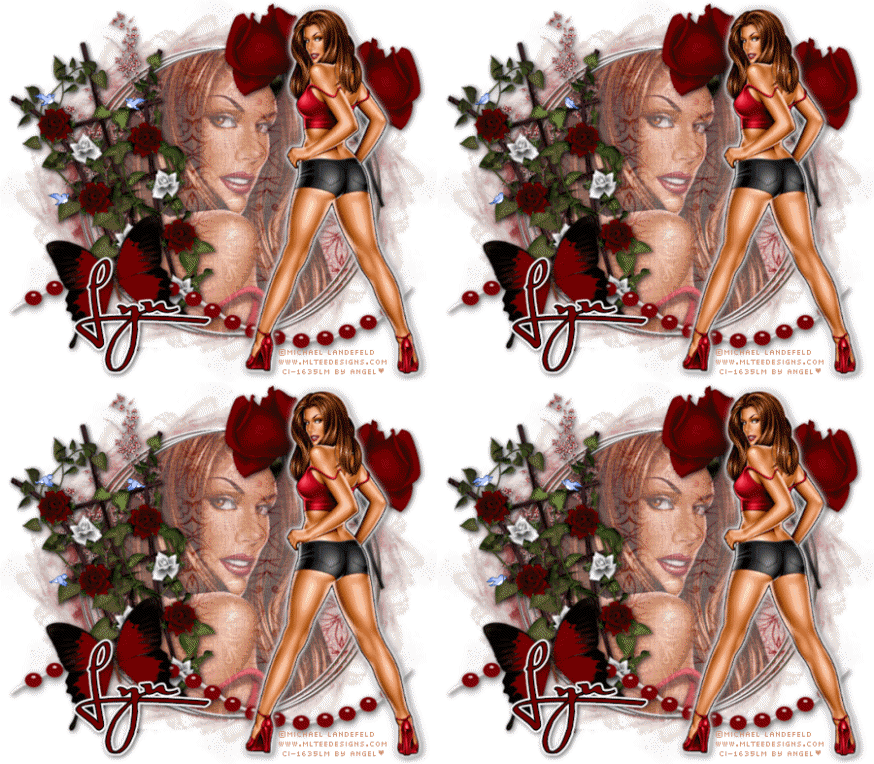
♥ I Love You Sexy ♥

To View the Tag In the proper size click on the Tag
Supplies Needed
Scrapkit by Fantasy Moments called Sweet Valentine this is FTU Can be downloaded
Here
Template 7A by Me this is FTU you will find this
Here
Tube of choice im using ©Popeye Wong this is FTU you will find this
Here
Font of choice or the one im using is Miss Le Gatees
Lets Get Started
Open Template Duplicate close original template delete © Layer
Go to Raster 1 layer selection select all float defloat Open FM-Sweet Valentine Paper-20 copy paste as new layer invert delete on keyboard select none add drop shadow repeat shadow
Go to raster 2 adjust sharpen add drop shadow
Go to Raster 3 layer selection select all float defloat Open FM-Sweet Valentine Paper-6 copy paste as new layer invert delete on keyboard select none
Go to raster 4 layer selection select all float defloat Open FM-Sweet Valentine Paper-17 copy paste as new layer invert delete on keyboard select none add gradient glow
Go to Raster 5 layer selection select all float defloat Open FM-Sweet Valentine Paper-16 copy paste as new layer invert delete on keyboard add drop shadow
Go to raster 6 layer selection select all float defloat Open FM-Sweet Valentine Paper-1 copy paste as new layer invert delete on keyboard select none add gradient glow & add drop shadow
Go to raster 6 layer selection select all float defloat Open FM-Sweet Valentine Paper-1 copy paste as new layer invert delete on keyboard select none add gradient glow & add drop shadow
Open FM-Sweet Valentine-Element-7 copy paste as new layer resize 45 percent add drop shadow
Open FM-Sweet Valentine-Element-75 copy paste as new layer resize 40 percent add drop shadow
Open FM-Sweet Valentine-Element-20 copy paste as new layer resize 45 percent then with pick tool bring in on sides sharpen 2 times add drop shadow drag under the heart layers
Add your name Font Miss Le Gatees forground #ffffff background #c40000 add drop shadow
Add your copyright info
resize & save your tag
Love to see your results please email to me so i can put in my show off blog
Thankyou ♥
Written by ©Lyn(akaAngel) 19th March 2011, any similarity to any other tutorial is purely coincidental!
♥Sweet Lil' Thing ♥

To View Tag In Proper Size Click On The Tag
Supplies Needed
Scrapkit by scrapandtubes called Girlie Valentine this is FTU you can download kit from
Here
Tube of choice im using ©Lady Mishka i brought my license & tube at PTE she is no longer selling there you can purchase her tubes Here
Mask WSL_Mask 224 at weescotslass
Here
Font of choice or the one im using is BluePlateSpecialSW
Lets Get Started
Open new image 650x550
Open Girlie Valentine_Paper2_Scrap and Tubes copy paste as new layer apply mask merge group effects texture effects weave with this setting

Open Girlie Valentine_Frame_Scrap copy paste as new layer resize 71 percent with magic wand click in frame modify expand by 2
open Girlie Valentine_Paper1_Scrap and Tubes copy paste as new layer invert delete on keyboard select none drag paper under frame add drop shadow to frame
Open Girlie Valentine_Bow_Scrap and Tubes copy paste as new layer resize 67 percent again resize 85 percent add drop shadow
Open Girlie Valentine_Trail of Hearts_Scrap and Tubes copy paste as new layer drag under frame add drop shadow
Open Girlie Valentine_Pendant_Scrap and Tubes copy paste as new layer resize 58 percent sharpen add drop shadow
Open tube copy paste as new layer drag under frame erase any over lapping lower opacity 66 percent add drp shadow
Open main tube copy paste as new layer mirror add drop shadow
Add your name & the words Sweet Lil'Thing Font BluePlateSpecialSW forground #ce6f91 background #fbc9dc weave same setting as before add gradient glow & add drop shadow
Add your copyright info
resize tag
merge all visible apply xero porcelian with this setting

save your tag as png
Love to see your results please email to me so i can put in my show off blog
Thankyou ♥
Written by ©Lyn(akaAngel) 12th March 2011, any similarity to any other tutorial is purely coincidental!
♥ Wrap Me Up In Chocolate ♥

Supplies Needed
Scrapkit by xena princess warrior called Valentine this is FTU you can download kit from
Here
Tube of choice im using ©Cathy Martin Here
Mask WSL_Mask 38 at weescotslass Here
Font of choice or the one im using is Wrap Me Up In Chocolate & Inspiration
Lets Get Started
Open new image 650x550
Open 24 Valentine Chocolate Paper 04 copy paste as new layer apply mask merge group duplicate merge down
Open 01 Valentine Chocolate Frame 01 copy paste as new layer resize 70 percent again resize 80 percent with magic wand click in frame modify expand by 5
open 22 Valentine Chocolate Paper 02 copy paste as new layer resize 60 percent invert delete on keyboard drag paper under frame Open tube copy paste as new layer delete on keyboard select none drag under frame Luminance (L)
Open 07 Valentine Chocolate Teddy Bear copy paste as new layer resize 70 add drop shadow drag under frame
Open 10 Valentine Chocolate Symphony copy paste as new layer resize 40 percent add drop shadow
Open 11 Valentine Chocolate Kiss copy paste as new layer resize 25 percent add drop shadow
Open tube copy paste as new layer add drop shadow
Open 17 Valentine Chocolate Kissy Lips 02 copy paste as new layer resize 85 percent image rotate 25 percent left add drop shadow
Add the words Wrap Me Up In Chocolate Font Cooper Black forground #000000 background #916446 add drop shadow
Open 13 Valentine Chocolate Bow copy paste as new layer resize 15 percent duplicate mirror merge down add drop shadow
Add your name Font Inspiration forground #00000 background #916446 add drop shadow
Add your copyright info
resize & save your tag
Love to see your results please email to me so i can put in my show off blog
Thankyou ♥
Written by ©Lyn(akaAngel) 7th March 2011, any similarity to any other tutorial is purely coincidental!
♥ Be Mine ♥

Supplies Needed
Scrapkit by melissazcreationz called My Sweet Valentine Kit this is FTU you can download kit from
Here
Tube of choice im using ©Elias Chatzoudis to purchase tubes go Here
All my tubes are a guide if the tubes i select are unavailble please use another tube of your liking thankyou
Mask WSL_Mask 178 at weescotslass Here
Font of choice or the one im using is Licorice
Lets Get Started
Open new image 650x550
Open raster 12 paper copy paste as new layer apply mask merge group duplicate merge down
Open raster 3 frame copy paste as new layer with magic wand click in frame modify expand by 2
open merged paper copy paste as new layer invert delete on keyboard select none drag paper under frame add drop shadow to frame
Open raster35 element copy paste as new layer add drop shadow
Open raster39 element copy paste as new layer mirror add drop shadow
Open raster17 element copy paste as new layer duplicate 2 times add drop shadow
Open tube copy paste as new layer add drop shadow
Open raster5 copy paste as new layer add drop shadow
Add your name Font Licorice forground #9f3468 background #f56ba6 add drop shadow
Add your copyright info
resize & save your tag
Love to see your results please email to me so i can put in my show off blog
Thankyou ♥
Written by ©Lyn(akaAngel) 15th February 2011, any similarity to any other tutorial is purely coincidental!
Subscribe to:
Posts (Atom)